Citi, U.S. Bank, TD Bank, PNC and American Express each print their statements differently, and most conversion errors come from those differences, not from misread digits. This dataset lists what each bank typically prints, what breaks when the PDF is turned into rows, and the check that catches it. ZeraBooks uses the same checks to prove every converted statement against its printed balances.
| Bank | Part | How it typically prints | What breaks | Check that catches it |
|---|---|---|---|---|
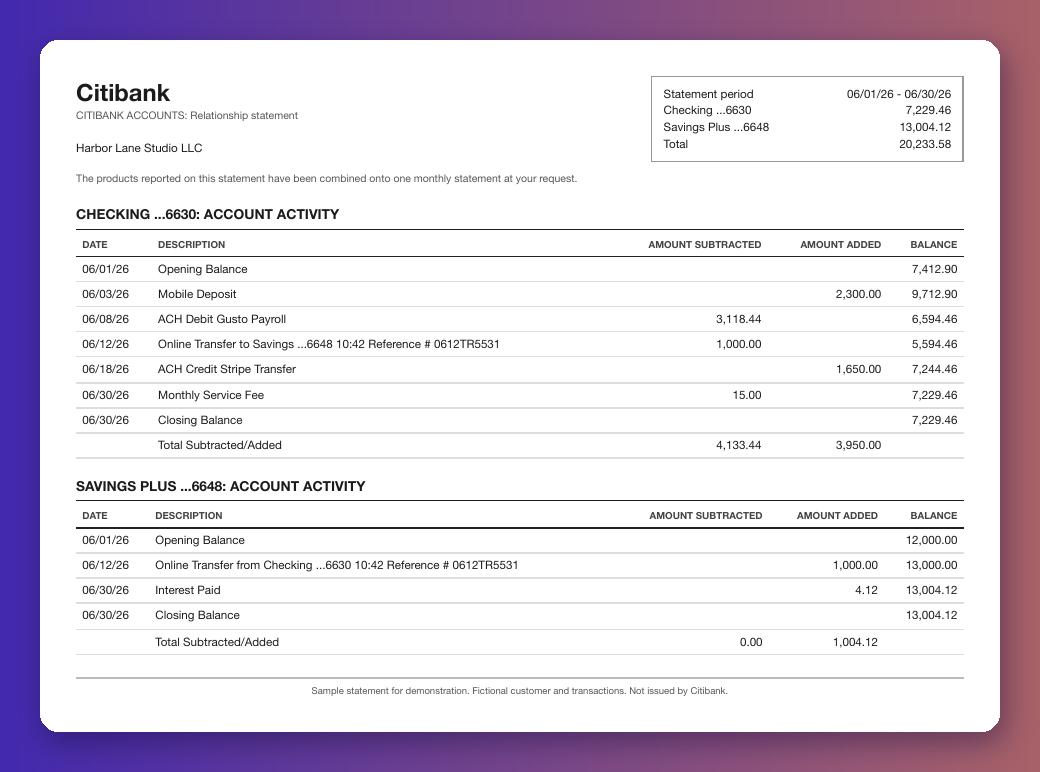
| Citi | Statement scope | A relationship statement can combine checking, savings and CDs onto one monthly statement, each product with its own opening and closing balance | Rows from two accounts land in one sheet and neither account ties | Tie each product to its own printed opening and closing balance |
| Citi | Columns | Date / Description / Amount Subtracted / Amount Added / Balance | A converter that expects one Amount column loses the direction of money | Opening + Added - Subtracted = Closing for each product |
| Citi | Balance lines | Opening Balance and Closing Balance printed as dated lines inside the activity table | The balance lines get read as transactions and double the total | Drop lines whose amount equals a printed balance, then re-tie |
| Citi | Dates | MM/DD/YY; online transfers carry a time and a Reference # | Two-digit years parsed as 1926 in some spreadsheets | Year taken from the statement period |
| Citi | Credit card block | A CREDIT CARDS summary as of the last card statement; the card statement itself comes separately | Summary lines imported as card charges | Card summary is not activity; convert the card statement on its own |
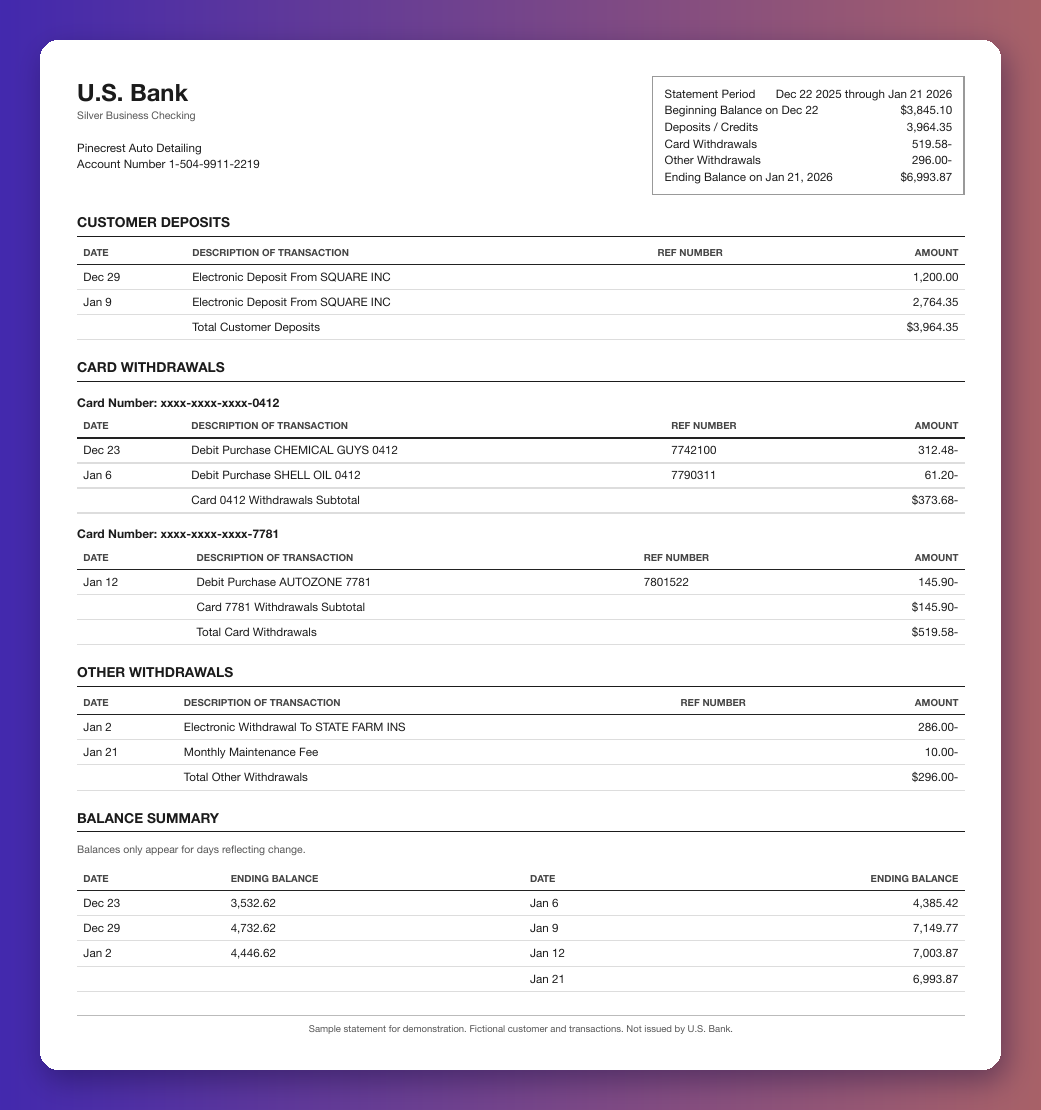
| U.S. Bank | Statement period | Period such as Dec 22 2025 through Jan 21 2026, rarely a calendar month | Month-based workpapers miss or double the days that straddle months | Chain each statement's beginning balance to the prior ending balance |
| U.S. Bank | Dates | Transaction dates printed as Jan 6 with no year | December rows on a January statement land in the wrong year | Year from the statement period; December dates on a Dec-Jan statement are the prior year |
| U.S. Bank | Signs | Withdrawals printed with a trailing minus, such as 27.60- | Trailing minus dropped, so a withdrawal becomes a deposit | Running balance; a gap of exactly twice one amount means a flipped sign |
| U.S. Bank | Card withdrawals | Grouped by masked card number, each group with a subtotal, then Total Card Withdrawals | Subtotal lines imported as extra withdrawals | Section totals must equal the sum of their rows, not be added to them |
| U.S. Bank | Balance summary | Ending balance printed only for days with activity (Balances only appear for days reflecting change) | Empty balance cells treated as zero | Check the running balance only on days the bank printed one |
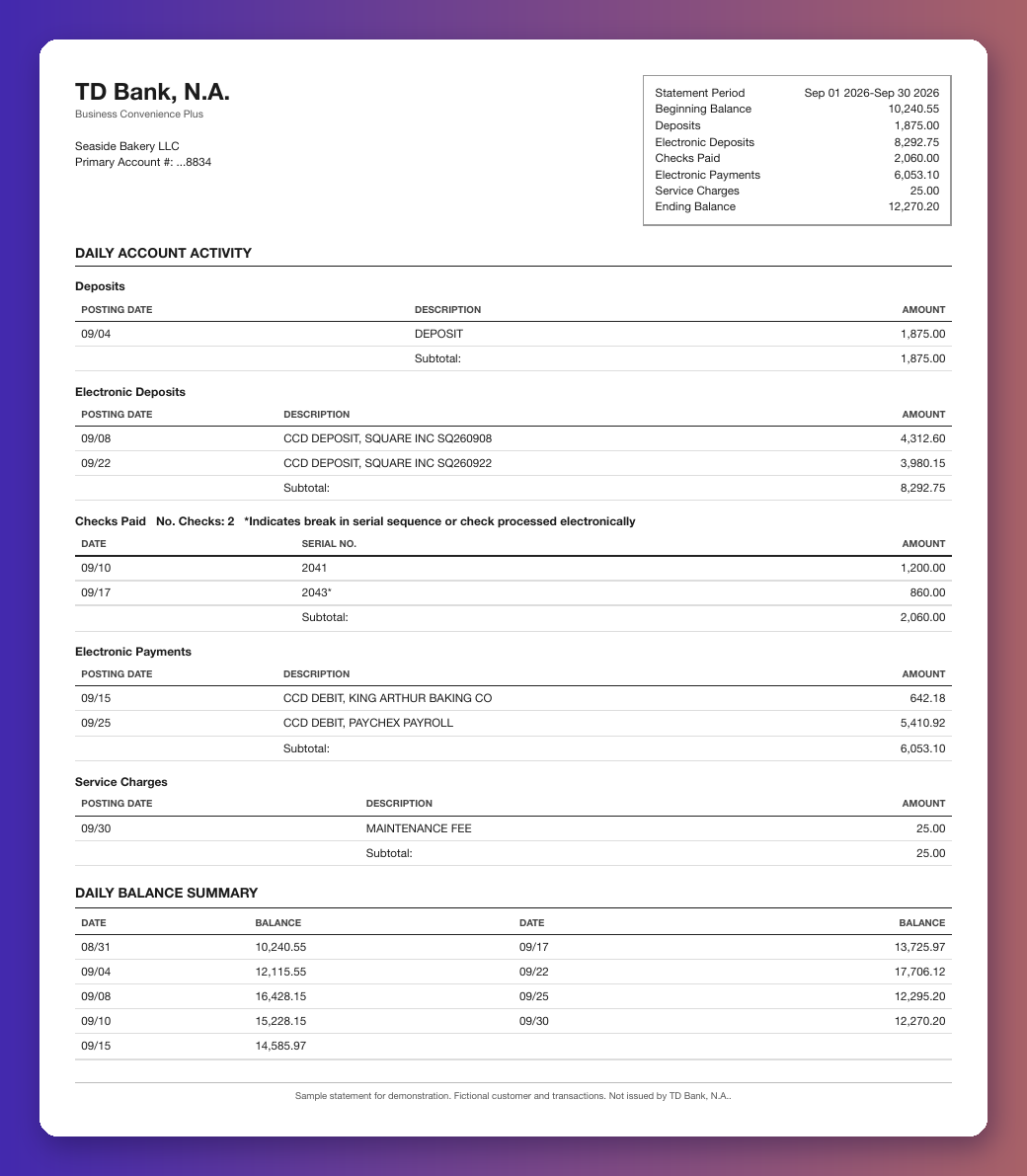
| TD Bank | Activity blocks | DAILY ACCOUNT ACTIVITY split into Deposits, Electronic Deposits, Checks Paid, Electronic Payments, Other Withdrawals and Service Charges | Block order is not date order, and block subtotals read as rows | Sort by posting date after reading; Account Summary totals by kind must match each block |
| TD Bank | Checks Paid | Checks listed in serial order with an asterisk marking a break in the sequence | The asterisk read as part of the check number, or the gap taken as a missing row | A gap in check numbers is not a missing transaction if the balance ties |
| TD Bank | Which TD | TD Bank, N.A. (U.S.) is a different bank from TD Canada Trust | Downloads looked for on the wrong site | Use the U.S. online banking site |
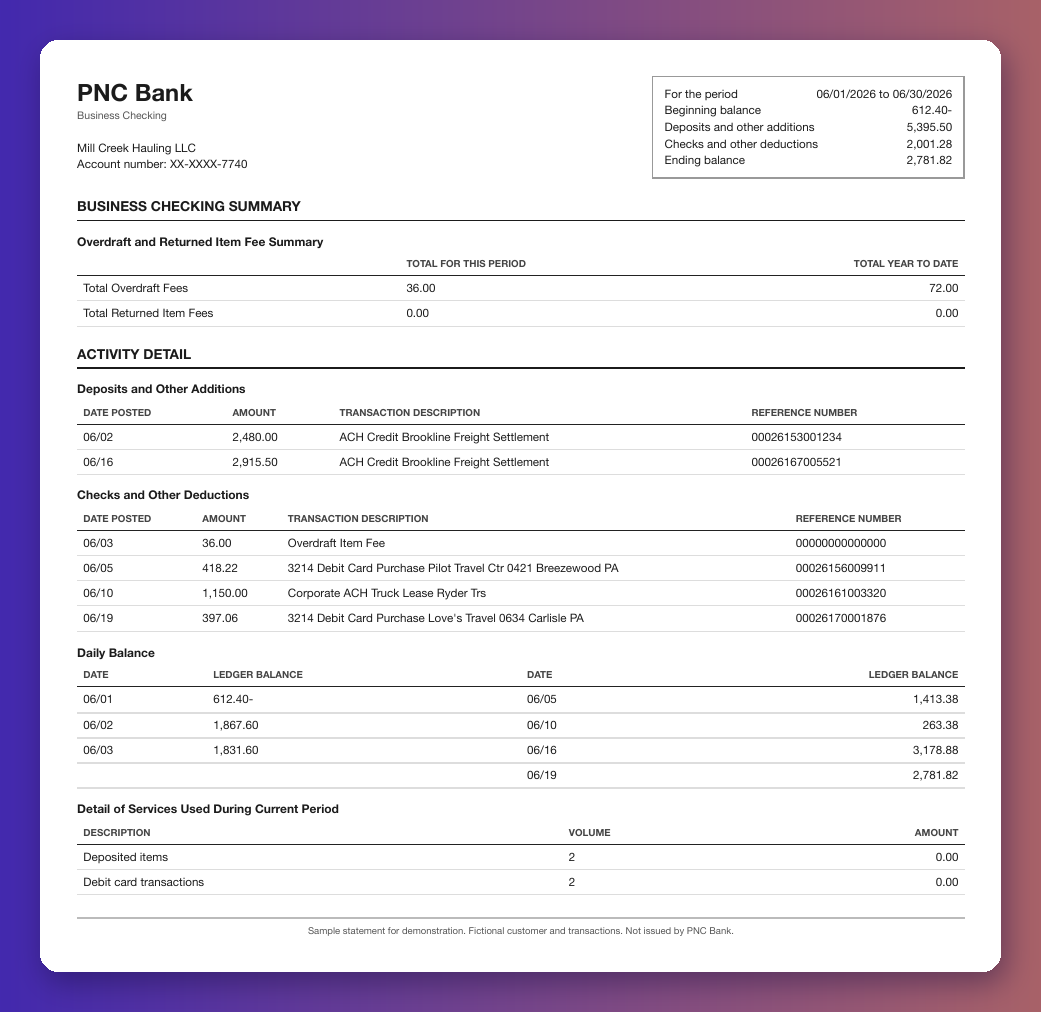
| PNC | Overdrawn balances | Negative balances printed with a trailing minus, such as 1,441.08- | An overdrawn opening balance read as positive; the whole month is off by twice the overdraft | Opening sign checked against the first printed daily balance |
| PNC | Activity detail | Columns Date posted / Amount / Transaction description / Reference number; debit card lines start with the card's last 4 digits | Card digits read as part of the amount | Amount column only; card digits stay in the description |
| PNC | Fee and service tables | Overdraft and Returned Item Fee Summary and Detail of Services Used During Current Period | Year-to-date fee totals and service volumes imported as transactions | Only Activity Detail rows count toward the balance |
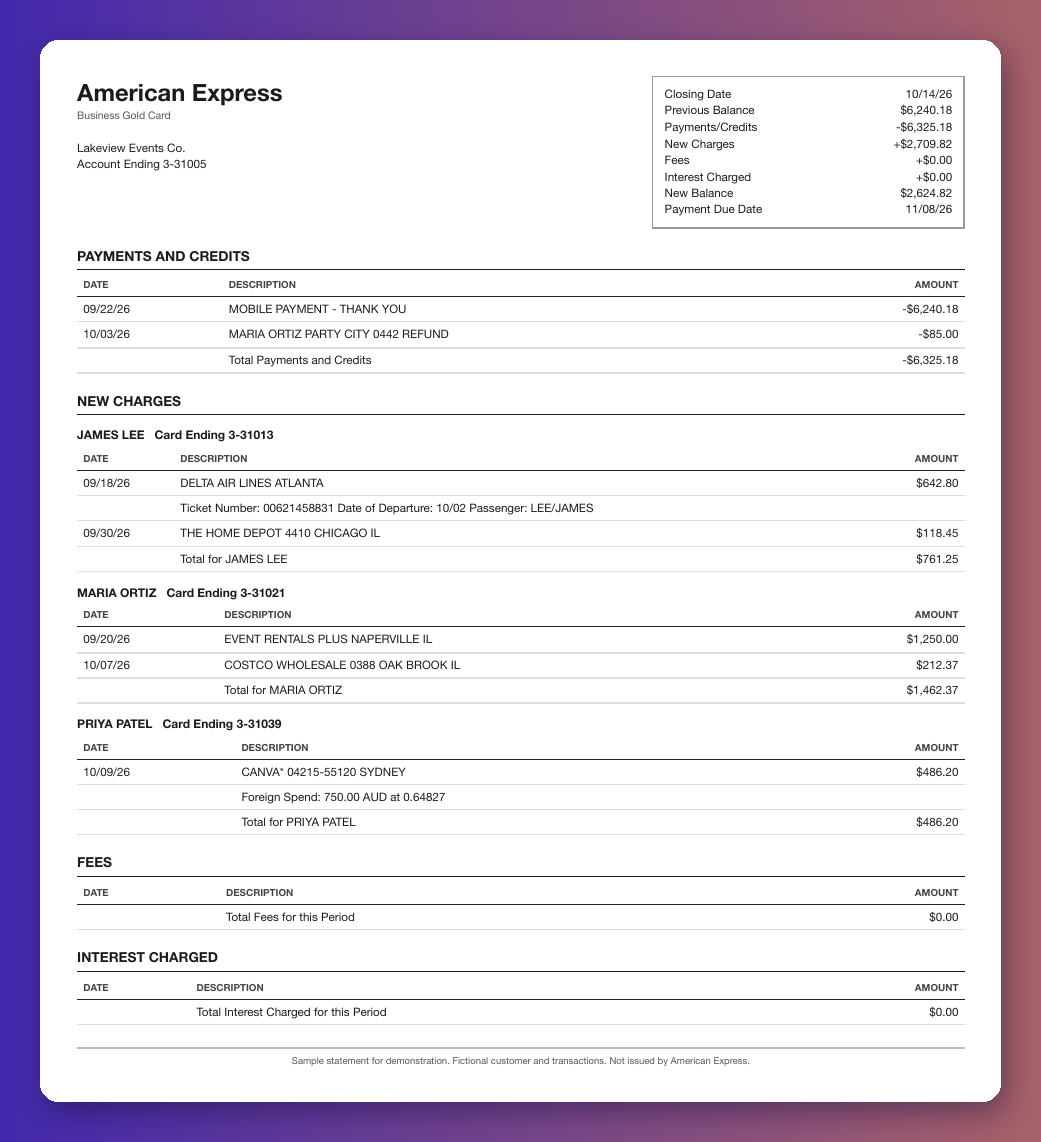
| American Express | Billing period | Closes mid-month, for example 09/15/26 to 10/14/26 | Charges split across two calendar months in the books | Previous Balance - Payments/Credits + New Charges + Fees + Interest = New Balance |
| American Express | Card members | Charges grouped under each card member with a total per member | Per-member totals imported as charges | Each member's rows must add to that member's printed total |
| American Express | Detail lines | Travel detail (Ticket Number, Date of Departure) and Foreign Spend lines under a charge | Detail lines read as extra charges, or the foreign amount read as the dollar amount | Detail lines carry no dollar amount of their own; the file total still ties |
| American Express | Signs | Payments and credits printed with a minus | A refund read as a charge | Card total ties as charges less refunds |
Each sample is a fictional business made for this dataset. The PDFs carry the bank name as plain text and say in the footer that they were not issued by the bank. Every one ties: opening balance plus every row equals the printed closing balance.
Checking 7,412.90 to 7,229.46 and savings 12,000.00 to 13,004.12, with a $1,000.00 transfer on both accounts. Guide: Citi bank statement to Excel.
Dec 22 2025 through Jan 21 2026. 3,845.10 + 3,964.35 − 519.58 − 296.00 = 6,993.87, withdrawals printed with a trailing minus and card withdrawals grouped by card. Guide: U.S. Bank statement to Excel.
September 2026. 10,240.55 + 1,875.00 + 8,292.75 − 2,060.00 − 6,053.10 − 25.00 = 12,270.20, with check 2043* after 2041. Guide: TD Bank statement to Excel.
June 2026, opening overdrawn at 612.40-. −612.40 + 5,395.50 − 2,001.28 = 2,781.82. Guide: PNC bank statement to Excel.
09/15/26 to 10/14/26, three card members. 6,240.18 − 6,325.18 + 2,709.82 = 2,624.82. Guide: American Express statement to Excel.
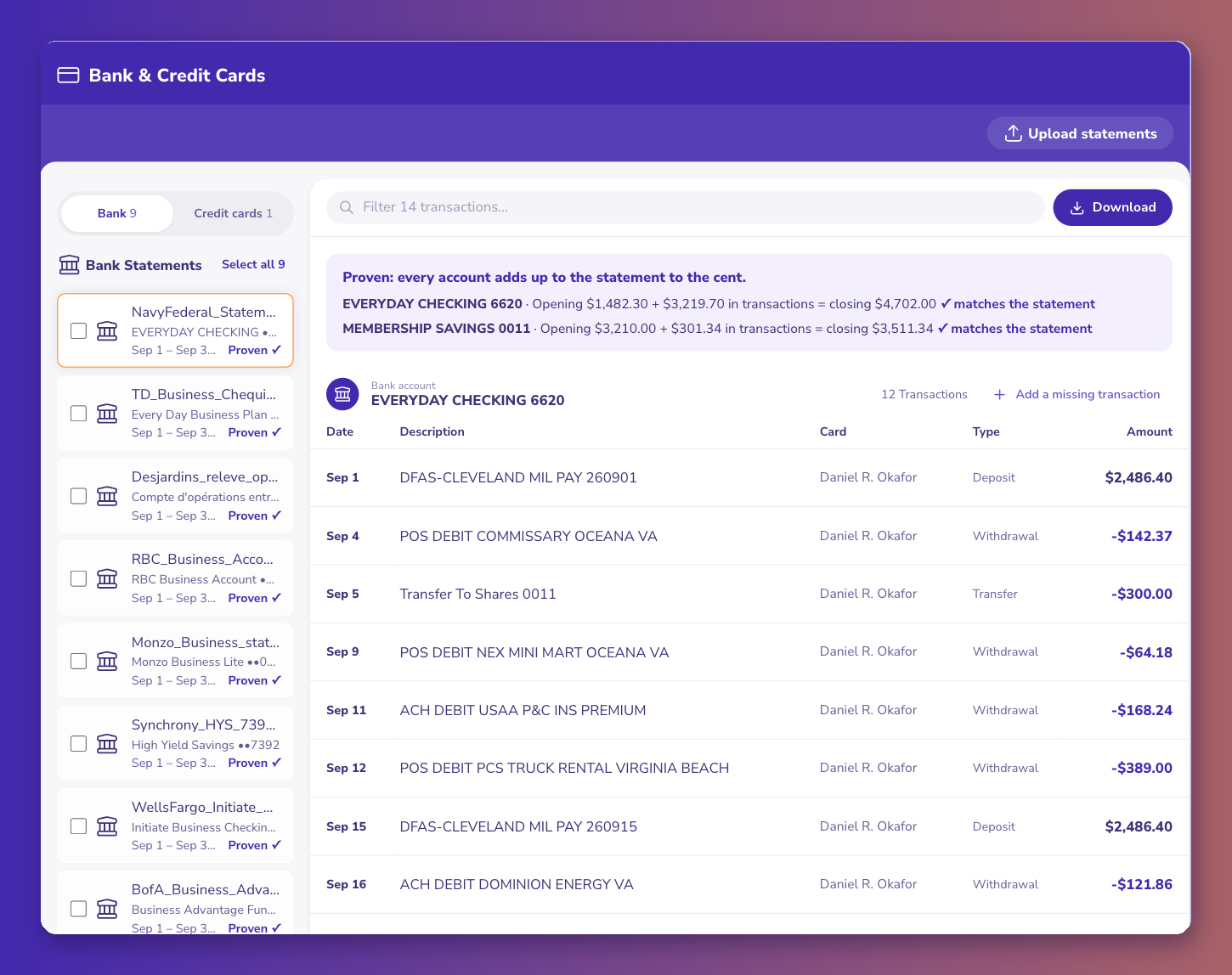
ZeraBooks Convert reads each statement page as an image, keeps every amount as printed (trailing minus, CR, DR, parentheses), takes the year from the statement period, leaves out printed balance lines and section totals, and drops a recap table (such as a checks paid summary) only when the account still ties without it. Then it proves each account, and each card member on a card statement, against the opening and closing balances the bank printed. Below, a two-account statement (checking and savings in one PDF) proven account by account.
For the whole method, see the bank statement converter and bank statement to Excel guides. Layouts for Chase, Bank of America, Wells Fargo, Capital One, RBC and TD Canada Trust are in the companion dataset, bank statement formats.
PNC typically prints a negative balance with the minus after the number. 612.40- means the account opened the period overdrawn by $612.40. A converter that drops the trailing minus reads the opening as positive and the whole month comes out wrong by twice the overdraft, $1,224.80 in the sample.
U.S. Bank typically prints transaction dates like Jan 6 and states the year only in the statement period, which rarely matches a calendar month. On a Dec 22 2025 through Jan 21 2026 statement, December rows belong to 2025. Take the year from the period, not from today's date.
Several. Citi can combine checking, savings and CDs onto one monthly PDF, and each product has its own opening and closing balance. Convert and prove each product on its own; a transfer between them shows on both.
TD Bank typically marks a break in the check number sequence with an asterisk. Check 2043* after 2041 means 2042 hasn't cleared in this period. It is not a missing row if the statement still ties.
Previous Balance minus Payments/Credits plus New Charges, Fees and Interest must equal the New Balance, and each card member's charges must add to that member's printed total. Travel detail and foreign spend lines carry no dollar amount of their own.
Yes. ZeraBooks Convert reads Citi, U.S. Bank, TD Bank, PNC and Amex PDFs, scanned or digital, keeps amounts as printed (trailing minus, CR, parentheses), and proves every account and card member against the printed balances before you download Excel or CSV. Pricing is $79 a month billed annually or $149 monthly for 1,000 pages a month, with a 7-day trial.