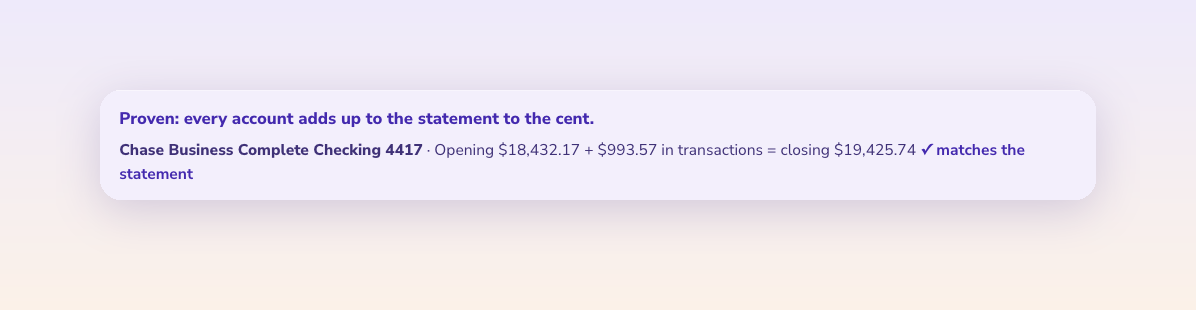
The best bank statement converter is the one that proves its output against the statement itself: opening balance plus every extracted line must equal the printed closing balance. ZeraBooks' bank statement converter runs that check on every statement, to the cent, and flags one that doesn't tie. Below is what nine converters publish, from their own pages, checked November 8, 2026.
| Converter | Free option | Cheapest paid plan (USD) | Output formats | Balance check published | Scanned PDFs |
|---|---|---|---|---|---|
| ZeraBooks | One statement up to 5 pages, no sign-up | $79/mo billed annually or $149 monthly, 1,000 pages/mo (also includes the general ledger) | Excel, CSV (standard, QuickBooks-ready, Xero-ready, Sage-ready layouts) | Yes: opening balance plus transactions must equal the printed closing balance, to the cent | Scanned PDFs: yes |
| BankStatementConverter.com | Anonymous pages every 24 hours (count not shown on its page) | Starter $30/mo, 400 pages/mo | Excel (XLS) | Not stated | Not stated |
| DocuClipper | 14-day trial, up to 120 pages | Starter $29/mo monthly ($20.30/mo annual), 60 pages/mo | XLSX, CSV, QBO, IIF, OFX, QFX, QIF | Yes: checked against printed opening and closing balances | OCR listed; scanned bank statements not stated |
| MoneyThumb 2xls Convert Pro+ | Trial (limit per its trial page) | $24.95/mo or $199.95/yr, 5 conversions/mo | XLS, CSV | Yes: auto-balance and reconciliation | Scanned PDFs with the PDF+ add-on ($199.95/yr, Windows) |
| Zamzar | Free, files up to 50 MB | Not stated on the tool page | Excel, CSV | Not stated | Not stated |
| Founderpath | Free, up to 5 files, 10 MB total | No paid tier | CSV, XLSX (ZIP) | Not stated (running balances if available) | Not stated |
| Rocket Statements | Free start (limit not stated) | Basic $8/mo, 1,200 pages/yr | Excel, CSV, JSON, XLS | Not stated | Accepts PDF and image uploads; OCR not stated |
| BankStatementWizard | 10 pages/month | $30/mo, 400 pages/mo | XLSX, CSV, JSON | Yes: reconciliation with the balance | Yes: digital, scanned or image-based |
| ProperSoft ProperConvert | Desktop trial (limit not stated) | From $19.99/mo (allowance not stated) | QBO, IIF, QBJ, QFX, QIF, OFX, CSV, XLSX | Shows a balance-verified screen; opening/closing not stated | Yes: scanned documents |
Only what each vendor states on its own site is listed; “not stated” means we could not find it there. Prices change, so check the linked page before you buy.
Every converter reads a PDF and writes rows. The ways that goes wrong are quiet: a line on a page break is dropped, a deposit is read as a withdrawal, one digit is misread. The file still opens in Excel and looks fine. The only fast proof is arithmetic the bank already printed: opening balance + deposits − withdrawals = closing balance. Four of the nine tools say they run some form of that check; ZeraBooks runs it on every statement and will not hand you a file that silently doesn't tie.
Worked example (fictional): a Bank of America business statement for September 2026 with 18 lines. Opening 26,718.44 + deposits 29,554.05 − withdrawals 26,456.01 = 29,816.48, the printed ending balance. A converter that drops the 1,240.00 equipment loan payment would end at 31,056.48, off by exactly that amount.
Want the books done from those statements, not just a spreadsheet? ZeraBooks is AI bookkeeping software that runs your books: upload your bank statements and get back clean, reconciled books. See also the statement balance check script and the PDF statement reconciliation worksheet.
The best bank statement converter is one that proves its output: the opening balance plus every extracted transaction must equal the closing balance printed on the statement. Of the nine converters checked on November 8, 2026, ZeraBooks, DocuClipper, MoneyThumb and BankStatementWizard publish a balance check, and ZeraBooks states it to the cent and flags a statement that does not tie.
Add the printed opening balance to the sum of the extracted transactions. The result must equal the printed closing balance. If a running balance column was extracted, it must match line by line. A difference equal to one amount usually means a missing line; twice an amount means a flipped sign.
Yes. ZeraBooks converts one statement of up to 5 pages without sign-up, Founderpath converts up to 5 files free, Zamzar has a free tool, and BankStatementConverter.com allows anonymous pages every 24 hours. Paid plans start between $8 and $30 a month for most tools.
No. ZeraBooks exports Excel and CSV, including QuickBooks-ready, Xero-ready and Sage-ready CSV layouts. It does not make .qbo or IIF files.